A lot of visual designers I've worked with have convinced themselves every user's name is "Sara" without an "h".
For most of my career I've had to battle designers creating incredibly unrealistic best-case scenario mock-ups. You know what I'm talking about. The user's name is "Sara Smith" and always fits neatly on one line. Her profile picture looks like it was clipped out of a magazine. Her profile is completely filled out. The two columns of her profile content magically are exactly the same height.
Of course these best-case scenarios rarely, if ever, occur in the real world.
In order to create more robust and resilient designs, we need to concurrently account for the best situations, the worst, and everything in between.
Accounting for Variation
What if the user doesn't upload a profile picture? What if the user has 87 items in their cart? What if the product has 14 options? What if the blog post title contains 40 characters? What if it has 400 characters instead? Return user? First-time user? What if this article doesn't contain an image? What if we need to display an urgent message?
These "what if" questions are important to ask throughout the entire design process. Historically though, these questions often only get brought up late in the game after wireframes and comps have been approved and are in the process of being implemented. This is both a process and a tool issue.
I've seen these issues repeatedly come up when teams don't treat development as an essential part of the design process. Because developers live through the nightmare of having to fill in the gaps themselves, they're typically pretty good at asking those "what if" questions. Treating developers as equal members of the design team can prevent those antagonistic relationships–the ones where developers scold designers for creating unrealistic things and where designers argue with developers for being difficult and incompetent. I hope you don't know what I'm talking about here, but you probably do.
Processes is one issue, but our current crop of design tools are often poorly equipped to deal with dynamic content. Static tools like Photoshop paint a pretty picture, but trying to create a ton of variations incurs a tremendous amount of work. And while I've seen clever people do interesting dynamic things with static wireframing tools, they ultimately just add more pages to a PDF that will ultimately be discarded. Ok then, so into the browser we go. Wireframing in the browser can give us a more realistic idea of the Web environment, but it doesn't intrinsically solve the dynamic content issue. So how do we solve that?
Dynamic Design with Pattern Lab
Pattern Lab gives web designers some great tools to account for and manage dynamic content. Dave Olsen implemented some fantastic features that allows designers to quickly address a lot of those "what if" questions.
Separating Structure and Data
Pattern Lab uses Mustache to separate data from the HTML structure (quick side note: Pattern Lab will soon be rolling out an update that allows you to use whatever templating language you prefer. Three cheers for Dave!). So for example, we can take a look at a media object-ish molecule like this:
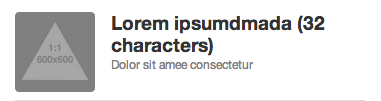
Under the hood, this pattern looks like this:
All the stuff contained in the double brackets {{}} is Mustache code, which will be replaced with dynamic data. The default data for this stuff lives in a JSON file called data.json in Pattern Lab. So here's what that JSON looks like:
So far this is pretty basic and is typical of any templating solution, but Pattern Lab does a few other things to take things to the next level.
Overriding default data
With atomic design, there's a distinct difference between templates and pages. Templates deal with the underlying content structure (markup, character lengths, image sizes and formats, etc), while pages are specific instances of those templates. At the page level, real representative content replaces the default placeholder content and is also where variations of a template are expressed. 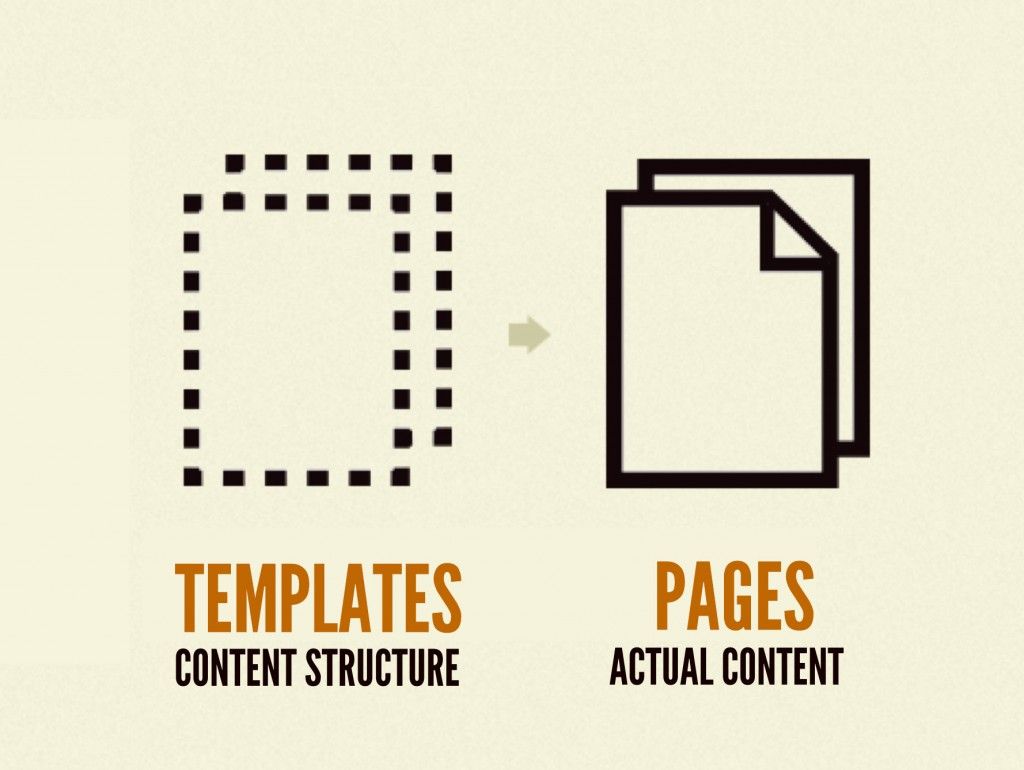
So now we can take our media-object pattern, include it on our homepage, and use page-specific data to override the default data. The result looks like this:

In order to accomplish this, we'll want to include our pattern in the homepage template and give it a name:
Now we can create a homepage.json file at the page level and override the default data for the include we've named "person":
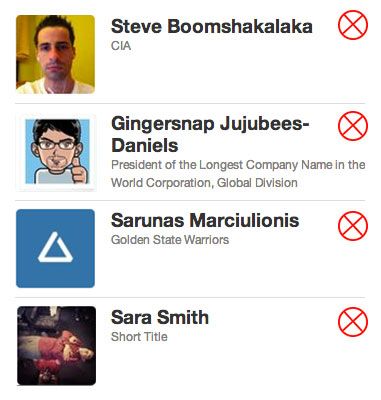
We now have real representative content in place, which allows us to test the resiliency of the underlying design system. Let's say there's another place on the homepage that includes an organism containing a whole list of these media object molecules. We can now loop over a JSON array to feed the appropriate data into the pattern, resulting in something like this:

Setting things up in this way keeps your code nice and DRY because we're able to edit the underlying pattern's structure and have those changes propagate to wherever it's included in the design system.
Taking it Further with Pseudo-Patterns
Dave also created a way to extend dynamic data even further with pseudo-patterns. Pseudo-patterns are JSON files that inherit the parent page's data and append additional data that can modify or extend existing data.
So let's say our homepage needs to provide a way for administrators to remove people from the list. We can create a pseudo-pattern called homepage~admin.json and make a small tweak to override our default data:
Setting this value to true might append a class to the body, include another pattern, or even dramatically alter the interface. It's up to you how to set up your templates. Maybe we want to include big red X buttons to remove people from the list:
Pseudo-patterns are a fantastic way to answer those "what if" questions by testing variations of a single template. What if we included a different hero image? What if we featured 20 stories instead of 10? What if the user has edit rights? What if this carousel wasn't there? By tweaking a couple lines of JSON we're able to quickly demonstrate all sorts of design scenarios, which leads to more thoughtful, robust, resilient design systems.
Dynamic Design Is Awesome
The Web is dynamic, so it's essential for us to design with these important "what if" questions in mind. We must move away from leaving those questions to the very end of our process if we want to create more thoughtful, realistic, resilient designs.