
Grunt is a powerful Javascript task runner that can make your web design workflow much more efficient by automating a slew of tedious tasks. Pattern Lab is a tool created by Dave Olsen and myself to help you efficiently create robust interface design systems. I'm super happy with how Pattern Lab and Grunt work together to make my design and development process so efficient.
Step 1: Set Up Pattern Lab
The first thing you'll need to do is install Pattern Lab and run it for the first time. When you get Pattern Lab up and running, your directories should look like this:
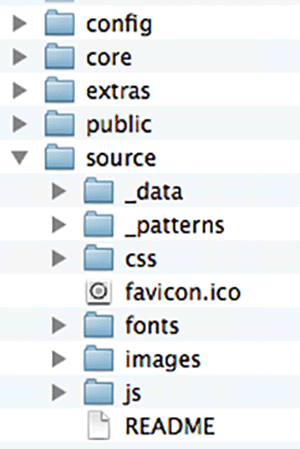
Pattern Lab is essentially a static-site generator with a PHP engine that compiles files from the /source directory to the /public directory to create the Pattern Lab interface. You can use different commands to fine tune what you want Pattern Lab to compile over to /public. More on this in a bit.
Step 2: Set up Grunt
If you've never used Grunt before, I highly recommend checking out this wonderful article by Chris Coyier to get you started.
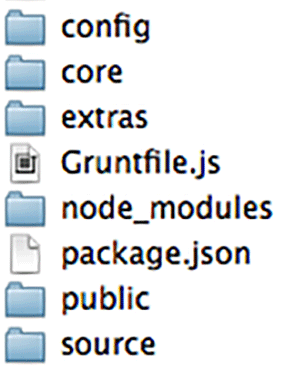
You'll want to set up Grunt at the root of your Pattern Lab project. Once you do that, your directory structure should look something like this:
Step 3: Configure Grunt to run Pattern Lab
Once Grunt is installed in the right place, you'll want to crack open the file called Gruntfile.js. This file is where you define all the tasks you want Grunt to take care of. We want to tell Grunt to compile Pattern Lab when certain types of files are changed. Here's what that looks like:
module.exports = function(grunt) {

  // Configuration
  grunt.initConfig({
    pkg: grunt.file.readJSON('package.json'),
      shell: {
        patternlab: {
          command: "php core/builder.php -gp"
      }
    },
    watch: {
      html: {
        files: ['source/_patterns/**/*.mustache', 'source/**/*.json'],
        tasks: ['shell:patternlab'],
        options: {
          spawn: false
        }
      }
    }
  });

  // Plugins
  grunt.loadNpmTasks('grunt-contrib-watch');
  grunt.loadNpmTasks('grunt-shell');

  // Tasks
  grunt.registerTask('default', ['watch', 'shell:patternlab']);
};
You can also view this code on Github
There's a few things going on here. First, is that we're including a couple Grunt plugins. One is grunt-watch, which watches for changes to files. The second plugin is grunt-shell, which can run any command from within Grunt.
What the watch section of the Gruntfile is saying is "Okay, whenever any changes are made to a .mustache or .json file in the /source directory, compile Pattern Lab with this command: php core/builder.php -gp. This command only generates the patterns, not CSS, JS, images, or anything else. We'll set up separate Grunt tasks to compile Sass files, concatenate and minify JS, optimize images, etc.
Step 4: Run Grunt
Once everything's set up, in the command line you can now navigate to your project folder and type grunt. This will run the tasks in Grunt and start watching for changes. Whenever a change is made to a .mustache or .json file, grunt will generate Pattern Lab.

Happy Grunting and Pattern Labbing!
I've been developing production-ready front end code with Pattern Lab for a year and a half, and can't imagine designing and developing without it. I now include Grunt as a can't-live-without development tool, and I'm super happy how well it works together with Pattern Lab. This workflow has definitely made me a lot more efficient as a developer, and hope you might find it useful as well. Enjoy!